 USD
 Website Builders
Remixly - Visual Website Builder & Page Editor SaaS (Laravel 13) - Import, Section Editor, Screenshots, ZIP Export, Publish
Product overview
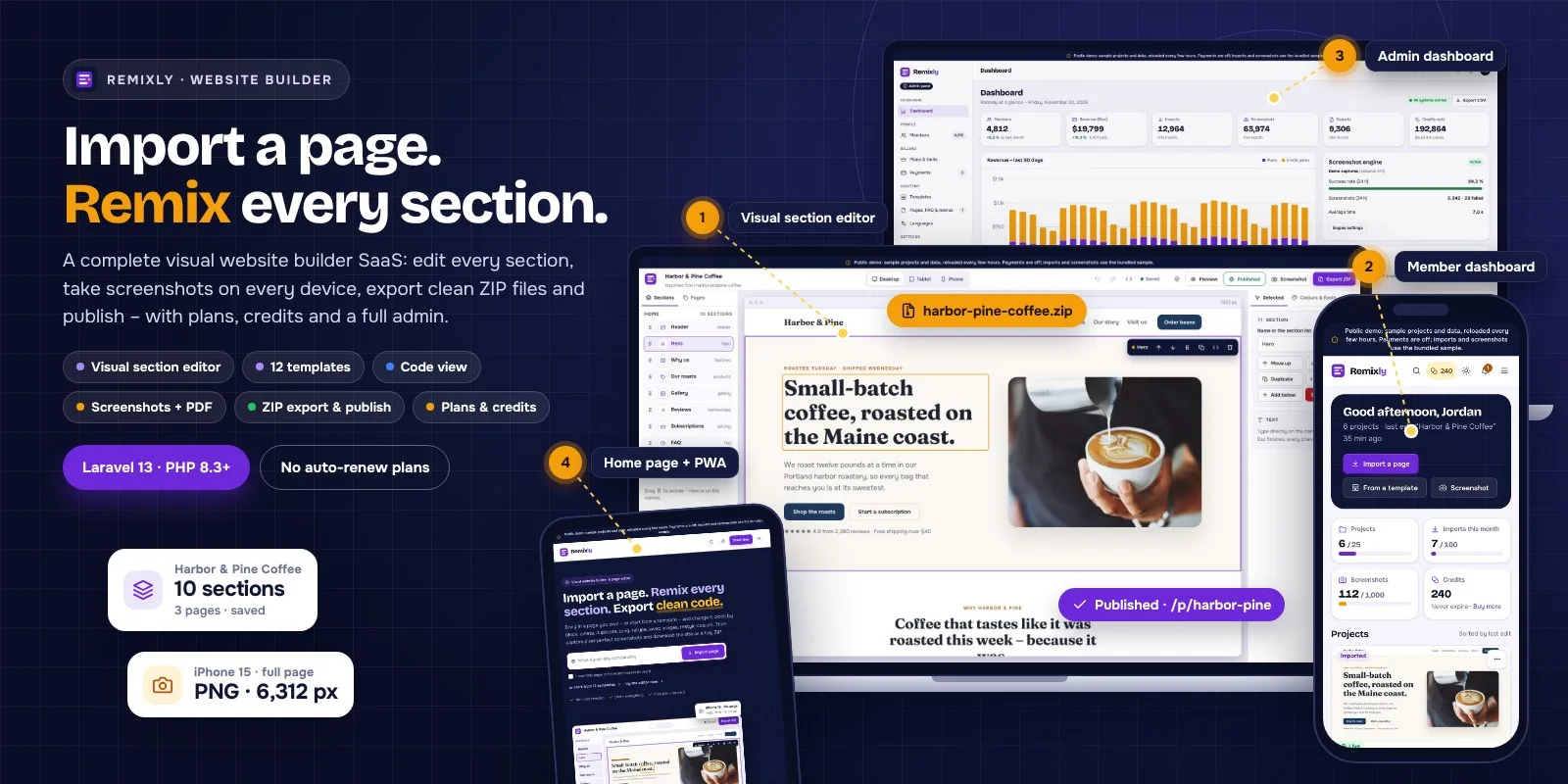
Laravel SaaS: import your own page or a template, edit every section visually, take screenshots on every device, export a ZIP and publish. Free / Pro / Agency plans + credit packs, 5 gateways, Google & Facebook sign-in.
Item details
Product demo
Description
Live demo logins
- Member (Jordan Ellis, Pro plan): email jordan.ellis@example.com / password demo1234 - one click: https://remixly.anowdemo.com/demo-login/member
- Admin (Avery Collins): email avery.collins@example.com / password demo1234 - one click: https://remixly.anowdemo.com/demo-login/admin
- Demo overview: https://remixly.anowdemo.com/codester/index.html
Remixly - bring a page, remix every section
Remixly is a complete visual website builder and page editor you run as your own SaaS. Members import a page they own or have permission to use (they confirm it before every import), or start from one of 12 templates or a blank page. Remixly splits the page into sections they move, duplicate, delete and edit right on the page - texts, images, links, colours and fonts - or extend with ready-made blocks and a code view per section.
Then they take screenshots on desktop, tablet and phone (full page, PNG, JPG, WebP, PDF), export clean files as a ZIP or publish the site on your domain. You earn with Free, Pro and Agency plans paid per month or year (No auto-renew - members get a reminder with a pay link) and credit packs. Stripe, PayPal, Paystack, Razorpay and bank transfer, US sales tax by state. Screenshots run on the service of your choice (ScreenshotOne, ApiFlash, Urlbox, ScreenshotAPI.net, Browserless) or on the included Chromium worker on your own VPS.
A product site that sells the builder
- Hero with a live editor preview, how it works, features, templates, screenshots, pricing and FAQ
- Templates gallery with search, categories and live previews
- Every section, heading and list edited in the admin - reorder or hide them
- Light theme and full dark mode, installable app (PWA), Google and Facebook sign-in
Start from your own page
- One page and every file it uses: HTML split into sections, CSS, scripts, images, srcset sizes, backgrounds, web fonts - links rewritten
- Mobile version, keep folder structure or rename assets, keep scripts or a static copy
- A consent tick before every import, a list of blocked websites, private networks never fetched
- Step-by-step progress with Cancel - credits come back on a failed or cancelled job
Edit every section visually
- Hover outline, select, move, drag to reorder, duplicate, delete
- Inline text editing, replace images (upload or library), edit links
- 10 ready-made blocks: hero, features, pricing, testimonials, FAQ, gallery, contact and more
- Colours and fonts per project, desktop / tablet / phone preview, undo / redo, autosave, versions, several pages
Code view when you want it
- HTML and CSS of the selected section with live sync to the canvas
- Switched on per plan and site-wide
- Title and description for search results per page
- The canvas runs without the page's scripts - safe editing
Pixel-perfect screenshots on every device
- Any address or a project page; full page or the visible part
- Desktop, tablet and phone devices (editable), PNG, JPG, WebP and PDF per plan
- Delay, zoom, hide cookie pop-ups; history with download
- Engine: five screenshot services by key or the included own Chromium worker (Docker or Node.js) - one active, shown clearly
Plans and credits - nothing renews
- Free, Pro and Agency for a month or a year - No auto-renew, reminder with a pay link
- Monthly allowances first, then credits; credit packs that never expire
- Stripe, PayPal, Paystack, Razorpay and bank transfer - amount and currency checked on the server, signed webhooks
- US sales tax by state, printable invoices, all countries and any currency
An admin that runs the whole SaaS
- Dashboard with revenue, members, jobs and projects, job queue and CSV report
- Members with projects, jobs, credits, plan days, notes and sign-in history
- Payments with bank transfer approval and refunds; plans, limits and credit packs
- Templates (upload a ZIP or turn a project into a template), blocks, home page, FAQ, pages, menus
Your brand, your colours
- Colour presets or your own colours - button text chosen for contrast
- Light and dark theme, logo, fonts, corners
- Languages with flags and auto-translate (DeepL, Google, LibreTranslate) - every visible text, also from the database
- Social networks with your own icons, two-step sign-in, team roles, backups, updates that apply themselves
What you get
- The complete script with the vendor folder and a browser installer (MySQL / MariaDB or SQLite) with optional demo data
- The own screenshot worker (Docker or Node.js) for a VPS, with its own guide
- Demo data: the member Jordan Ellis with six projects (one published), screenshots, exports and jobs, the team, payments and two years of daily totals - alive at any hour
- Illustrated HTML documentation: installation (cPanel, VPS, Windows), cron, screenshot engines and the worker, Google and Facebook sign-in, payments and webhook URLs, every settings area, demo mode, updates and FAQ
Good to know
- The importer is for pages your members own or may use - it is part of a builder, not a website copier: members confirm it before every import, you can block websites, and pages behind a login are never imported.
- Screenshots need an account with one of the supported screenshot services or a small VPS for the included worker - shared hosting cannot run a browser itself.
- Payment gateway and screenshot service names are trademarks of their owners and are named only to say what can be connected.
- Demo overview page: https://remixly.anowdemo.com/codester/index.html
- Website demo: https://remixly.anowdemo.com/
- One-click member demo (Jordan Ellis): https://remixly.anowdemo.com/demo-login/member
- One-click admin demo (Avery Collins): https://remixly.anowdemo.com/demo-login/admin
- Admin login (email / password): avery.collins@example.com / demo1234
- Public documentation: https://remixly.anowdemo.com/codester/docs/index.html
Core features
Members
- Sign-up with e-mail, Google or Facebook; e-mail confirmation, sign-in link, password reset, two-step sign-in with backup codes
- Dashboard with projects, live thumbnails, plan usage and credits
- Import a page you own or may use: HTML, CSS, scripts, images, fonts, links rewritten; mobile version, folder or renamed assets, static copy
- 12 templates with live previews, or a blank page
- Visual section editor: select, move, drag, duplicate, delete, inline text, images, links, 10 blocks, colours and fonts, devices, undo / redo, autosave, versions, pages
- Code view per section (HTML + CSS) with live sync
- Screenshots: full page or visible part, desktop / tablet / phone, PNG, JPG, WebP, PDF, delay, zoom, hide cookie pop-ups, history
- ZIP export of clean files; publish at /p/name in a sandbox
- Jobs page with progress and Cancel (credits back), billing with invoices
Money
- Free / Pro / Agency plans per month or year - No auto-renew
- Limits per plan: projects, pages, imports, screenshots, exports, import size, formats, templates, versions, publishing, code view, priority queue
- Credit packs; job costs in credits beyond the allowance
- Stripe, PayPal, Paystack, Razorpay, bank transfer with receipt approval
- US sales tax by state, all countries, any currency
Admin
- Dashboard with charts, members, payments with refunds, CSV exports
- Templates (ZIP upload, from a project), blocks, home page, FAQ, pages, menus, messages
- Screenshot engine: ScreenshotOne, ApiFlash, Urlbox, ScreenshotAPI.net, Browserless or own Chromium worker, with Test
- Colour presets, dark mode, social networks, PWA, languages with auto-translate, e-mail templates, team roles, backups, maintenance page, activity log
- Demo mode with one-click logins and keepers
Server requirements
- PHP 8.3 or newer (8.3, 8.4, 8.5)
- MySQL 5.7+ / 8.x or MariaDB 10.3+ (SQLite 3 for small sites and local tests)
- PHP extensions: pdo (pdo_mysql or pdo_sqlite), mbstring, openssl, tokenizer, xml, ctype, json, fileinfo, curl, gd (WebP), zip
- Apache with mod_rewrite (cPanel, Plesk, DirectAdmin), LiteSpeed or Nginx
- HTTPS (installable app, secure sign-in, Google and Facebook sign-in)
- One cron job every minute (recommended - jobs also run during page visits without it)
- Screenshots: an account with a supported screenshot service, or a VPS with Docker or Node.js 18+ for the included worker
Installation instructions
Install
- Create an empty MySQL / MariaDB database and user in your hosting panel and select PHP 8.3 or newer.
- Upload the contents of the remixly folder into the document root of your domain (the included .htaccess files route everything to the public folder) - or point the domain to its public folder.
- Open your domain: the installer checks the server, tests the database and creates the owner account (with or without demo data).
- Add the cron job:
* * * * * cd /path/to/remixly && php artisan schedule:run
After installing
- Admin > Plans & limits: prices, limits and credit packs.
- Admin > Settings > Screenshot engine: choose a service or your own worker, then Test.
- Admin > Settings > Payment gateways: keys and the webhook URLs shown there.
- Admin > Settings > Accounts: Google and Facebook sign-in (Redirect URIs shown with a Copy button).
- Admin > Settings > E-mail: SMTP and a test e-mail.
Full guide: documentation/index.html in the download.
Changelog
1.0.2 – November 2026
- The public demo does real imports, ZIP exports and screenshots out of the box.
- Free screenshot settings on the Screenshot engine page.
- Sign out in the side menu and the phone menu.
1.0.1 – November 2026
- Free screenshot page for visitors without an account: on/off, daily limit per visitor, full page, own texts.
- Real imports and screenshots on the public demo (Settings › Demo).
- Installer and settings screens polished.
1.0.0 – November 2026
- First release: import of own pages, 12 templates, visual section editor with blocks, colours and fonts, code view, pages, versions and autosave; screenshots with five external services or the own Chromium worker; ZIP exports; publishing at /p/name; Free / Pro / Agency plans (no auto-renew) and credit packs; Google and Facebook sign-in; Stripe, PayPal, Paystack, Razorpay and bank transfer; US sales tax; admin with members, payments, plans, templates, blocks, content and every setting; PWA, two-step sign-in, social networks, languages with auto-translate, backups and self-applying updates.
Reviews
Customer reviews
No reviews yet. Only customers who bought this product can write one.
You may also like
Website Builders